Showing posts with label DSDN104_p1_Hand-in. Show all posts

Sunday, 12 August 2012

Project One: Final Hero Shot


Final rendered hero shot:

Final hero shot in a different environment:


For my final model I have used copper as the material. I wanted a metallic coloured material that had a shine to help create the essence of the word shock. Also I found that the copper was a nice contrast to the white space emphasizing both of the words shock and insanity. In the first image I have put the model in a white square to emphasize the idea of being boxed in/ isolated to create the picture of an insane person in a psychiatric ward. I have also used the white space to again show the word shock and what shock is, pure white light that is shadowless. 

In the second image I have used an image which I found on google images (http://depositphotos.com/8206250/stock-photo-White-empty-padded-room.html) of a psychiatric ward. I have done this to show the same things as the other one but this time I have tried to create a space  that is more realistic rather than just a white square. I like this image because it looks like my model is going insane while being isolated with no escape. I think the colour of the model gives a shock factor as it stands out within its environment. 


Project One: Final 81 Iterations


For my final 81 iterations I have chosen to present them in a white shadowless box to represent the words shock and insanity. A shock is a pure white light that is shadowless. This is something that I wanted to emphasise in my final composition. I have also chosen to do the white box as it is something that I associate and insane person with. Capturing the idea of being isolated and boxed in. The reason for my colour choices is that I wanted to show a high contrast. Orange and Blue are two colours that do not go well together this represents clashinging of thoughts and the way the brain behaves when someone is insane. Overall I feel that the layout and visual aesthic represents all three of my words nicely and really captures the essence of insanity and shock. The view of my final model here is different to the view I have chosen for my final hero shot.

Project One: Background/ Environment And Materials

For my final renders I have decided to not use the orignal background which I had found showing shock. Once I renedered my hero shot I thought that it would only just get lost on the page as the background image was quite bright. Instead I did some rethinking and came to the conclusion that because my models show the word insanity and this is the word that I wanted to have be dominate over the rest, I did some research about envirnoments that you associate insanity with. The obvious space that I thought of was a pshyiatric ward at a mental hospital. Below are some images which I have found of pshyciatric wards. I think it would be so cool to have my model in a space similar to this making it feel isolated and boxed in. My model looks pretty insane so this could potentially offer me alot and support my narrative. For materials I am thinking of using copper metal as I want a metallic metal that will create contrast and look quite angry/ lost in the space.


Practice render of final model:


Here I have a practice render of my final model that I did to see what the copper material looked like. It is not quite what I want but it sure is getting there. I think I am either going to add more lights or change the position of the current lights to really like up parts of the copper to create a shock effect.

Project One: Lighting And Shadows

After watching some tutorials and seeing what effects you can create with lighting I have done some trial runs using different lights. I think the lighting looks amazing and some of the shadows that are created from the lighting really helps support the image but I was just not feeling that this was something necessary for my final 81 iterations. Below is a tester that I did. I also watched a few videos on caustics effect and mr onmi lighting just to see exactly what they could offer me.


Practise Lighting and shadows;


For my final 81 iterations I have decided to use lighting but only have shadows in the models not everywhere else. This is abit risky but I have good reasons as to why I would like it to be this way. I want my final 81 iterations to show what shock is as it is one of my words. Shock is a fast movement of pure white light that is shadowless it is this reason that I have chosen to show no shadows. 

Project One: Final Layout Decisions

After doing some rough sketches of potential layouts I have finally come up with one that I think reflects my words and looks pretty cool. I really wanted to show the word insanity through my layout by having it unordered but not soo much that it was hard to follow. With this in mind I have some parts in a grid to represent structure, alignment and control, all opposite qualities of the word insanity. I have then tried to show the process of becoming insane by having the grid begin to brake up and start to become unordered. This is also where I have tried to incorporate the word shock by having directional lines and finally I have tried to make sure that overall the layout does not look the same on both sides so that it reflects the word asymmetrical. 


Sketching layout ideas:


Screen shot of final layout:


Thursday, 9 August 2012

Project One: 81 Iterations

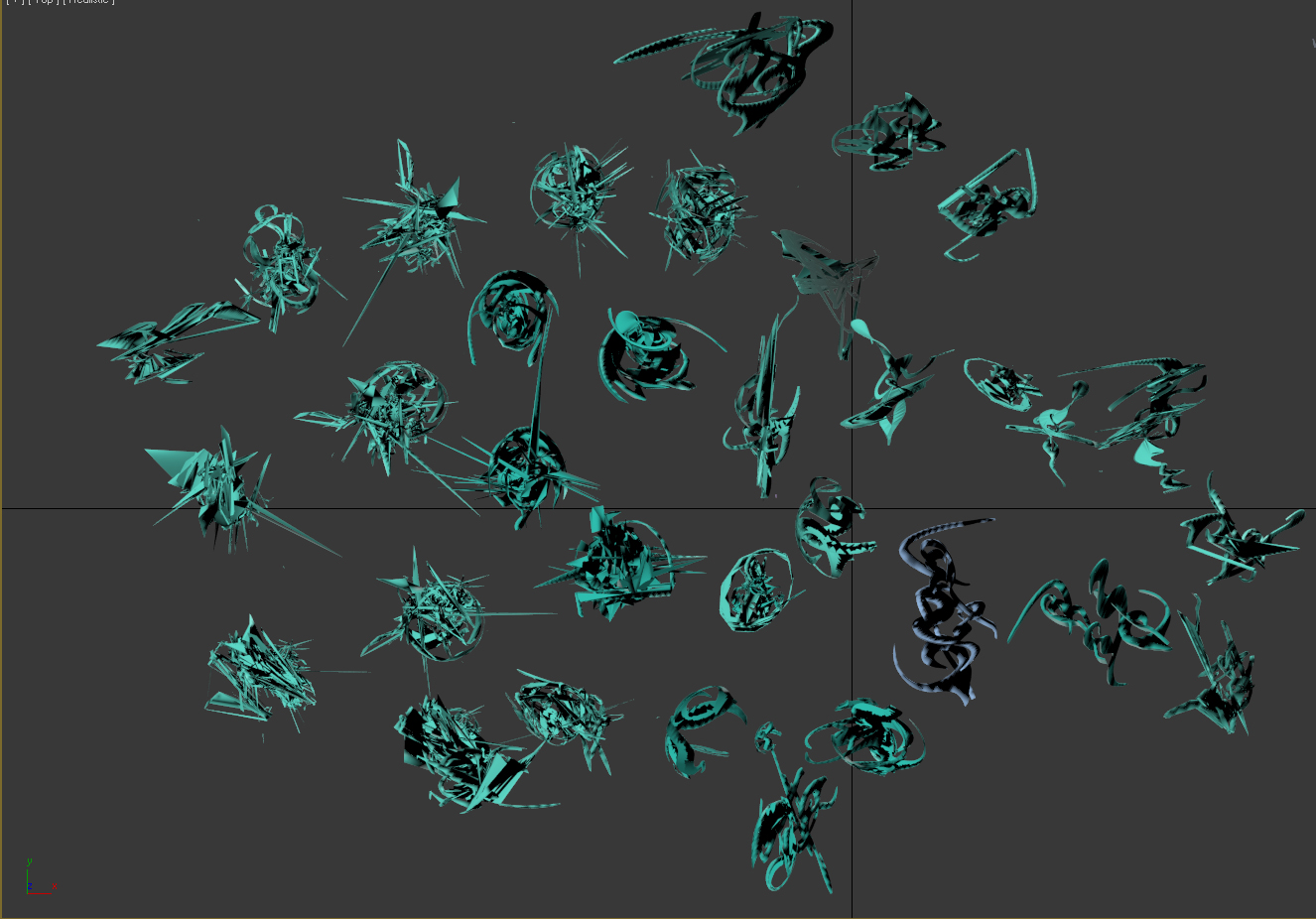
I have done it. Here is a screen shot of my final 81 models. I am pretty pleased with what I have managed to create. I really like my final model and think it describes the words shock, insanity and asymmetrical perfectly. For the final model I have tried to combine all of the ideas I found successful into one. I think with the right lighting my model could potentially have a really nice sense of movement through it where is visually looks like it's spinning and moving. I have not yet applied textures and materials but I am thinking about using a clear glass. Simple because glass is breakable creating that shock effect. I have also considered using a texture that is quite rugged to show mess and shock. I am going to find a few different materials and see which I think looks best. Something else I have been considering for my final 'hero' image is applying a image to  the background. A potential image which I was thinking of using is something that shows shock like the one below and then placing my model with in it. It would kinda have a lost in space feel to it refering to lost in the mind (insanity).

Final 81 Iterations:


Potential Background Image:

Sunday, 5 August 2012

Project One: 35 Iterations And Attempting Lighting & Materials.

Well I have spent the last couple of lessons plus many night times down at uni trying to apply materials to some of my models and then also applying lighting to them. For some starnge reason my file has a massive black circle on it and noone can seem to figure out why. At first it did not effect the rendering so I proceeded to add lighting. When I added the lighting it did not do what it was suppose to do but I thought that it might just render correctly so I tried  but then all of a sudden it says completed render but no image appears so just to show some evidence of trying I have taken some screen shots of my work. They look terrible but I did try. I seriously need to sort my positiong of models out on the plan before final hand-in but it isn't something that i am understanding how to do quickly even though I have been shown and followed many tutorials. I have decided that I am going to start a new file and just continue producing more iterations or I will never get them done. Hopefully in the next tutorial I can get some help with sorting it out and I will be well on the way again. I am a bit dissapointed with the way things have worked as I now feel behind but I am glad that I have come across this issue now and hopefully it can be fixed easily.


Finally I got something to render again

Wednesday, 1 August 2012

Project One: Potential Materials


These are some the materials which I have found that I would like to experiment with. They are all of broken glass. I think they fit my three words quite well. The imapct of the glass breaking creates a nice surface suggesting shock. Also the intersecting lines that come from the cracking of glass fits nicely with how I have been showing insanity through intersecting lines in my models.

Broken Glass:


Project One: Testing Materials/ Backgrounds And First 35 Models

Experimenting With Materials:


This is my first attempt at using the material option. I have used  two different images which I found on google images. Both of them are of broken glass. Is not very easy to see in this image but when you zoom right in on the program it looks soo awesome. I think once I have got the lighting sorted it will help enhance the material more. 


First 35 Images:


Practise Render:

I really want to make the composition and layout alot more exciting but it took me awhile to work out how to do it and understand the process. For the next render  I would also like to present my model of a plan with appropiate lighting and shadows.


 Background Practise:

This is just a real quick practise of putting in a background using an image from google images. I think if i was to do this for my final I would try and find something quiet suttle with a swir in it or something. I am not to sure yet though if I want to have a background for my final.

Friday, 27 July 2012

Project One: Model development

So far I have 16 iterations. Below is an image showing them. I have them in groups of four and each group in a different colour because each colour represents a different direction which I have gone from the orignal solid works model. I have chosen to do it this way because there was more than one way which I wanted to go with my model. 


In each group I have tried to portray what the movement of the mind might look like if you were going insane. I have used modifiers such as twist, bend and slice to show these iterations. I have tried to portray the word shock in each of them by have sharp spikes interlocking each other and cutting through the body of the model. I have also begun to incorporate a circular shape which suggests containment eg: of the thoughts which is causing someone to become inane as everything inside of them is building  up and they can no longer handel it. In the next lot of iterations I want to explore this more at a larger scale and begin to change the surface so that it is not just plan but tells a story in itslf. To do this I am wanting to try the shell tool and lattice tool. Hopefully these tools will create new perspective to the word asymmetrical as well.

For the next set of iterations that I am currently working on I am beginning to combine the ideas which I have explored in each of these groups.

Project One: Solid Works Model


Final Model:


Here I have three images which show the process of how I got to my final model in Solid Works. Through this model I wanted to express insanity through curved lines interlocking on different planes with one part slightly more to represent the core. I have added one sharp curve at the top to represent the movement of the word shock. Once I start my iterations in 3DSMAX I want to develope on these ideas and have them shown at a larger scale. For example more interlocking and more sharp curves coming out of the body of the shape. 


Thursday, 26 July 2012

Project One: Narrative

Insanity, Shock and Asymmetrical

For this project I am working with the three words insanity, shock and asymmetrical. I want to capture the essence of each of these words by focusing on what they mean to me and the connection they have between one another. Through each iteration that I show I want the model to reflect the idea of a person going insane and create a visual image of what the mind may look like when they are at this stage. I want to show this by having intersecting curves and lines. When I think of the three words together I can imagine lots of intersecting curves that have been manipulated with parts making a sphere shape to show the core of the mind that is in a tangle while being confused resulting to madness. To incorporate the other words with this idea I think sharp ends and the odd plane that curves out would be appropriate to emphasis the movement and image of the word shock. When I think of the word asymmetrical I automatically think triangles. For this project I would like to incorporate this into my model and have parts of it consisting of triangles. I don't think this should be the defining feature of the model but I do think it would add to the overall aesthetic while at the same time reflecting the word asymmetrical. 

Friday, 20 July 2012

Project One: Sketches

Insanity, Shock and Asymmetrical...

Below are some sketches of the words I have chosen. When drawing the sketches I have tried to show what I think each word means as well as capturing the essence of the word. I have also used some of my precedents as a tool for helping me sketch the words. I am still not completely sure how I am going to incorporate these ideas into a 3d model but after trying some more ideas out in Solid Works I would like to re sketch my words with more of a direction of the sketch becoming 3d. 


In these sketches I have used my precedents to explore the word shock. I think the sharp lines and interlocking is a key component when capturing the essence of this word. 


In these drawings I have began sketching the word asymmetrical in the top right and the other two are sketches of the word insanity. In the sketch of asymmetrical this is a representation of what I think the word looks like when I first think of it. The drawings of insanity are suppose to show the movement and lack of direction that the mind has when someone is insane. 


These sketches are exploring the word insanity as well. I have tried to incorporate the idea of asymmetrical into the drawing as well by having either side of the center point uneven. The drawing on the right is what I see insanity to be. The lines representing thoughts, movements and speech. All three of  these things hitting and clashing with each other creating the idea of madness and lack of control. Key  qualities of the word insanity .


In this last lot of sketches I have done drawings for the words insanity and asymmetrical. The top drawing is of the word insanity. I have tried to capture the essence of this word from a different perspective by using letters all jumbled up to express the concept of  overload in a person mind and not being able to control it causing them to eventually become insane. The bottom sketch is just a simple drawing of a form that holds the attributes of something being asymmetrical. 


Tuesday, 17 July 2012

Project One: Precedent Images


After deciding on the words insanity, shock and asymmetrical I have found some images which really fascinate me. I think the images which I have sourced help give a visual explanation of my chosen words, describing either what the word could look like or sound like as well as what the words mean to me. 


Precedent One: Shock
Link to image

This image uses curves in an interesting composition to create something which I think shows shock and the movement that this word creates. I like the sharpness of it and interlocking of the curves. To me these are to key qualities that define the word shock.  

Precedent Two: Swirl
Link to this image can no longer be found.

This image uses repetition of a curve that forms an overall swirl. I like how at the end of each individual swirl the thickness of the line becomes thinner and looks like it is fading out. I have chosen this image because I think it is a great visual of what ones mind might look like when insane. To me insanity is thoughts going around and around in your mind with no control or direction.


Precedent Three: Plasma Ball
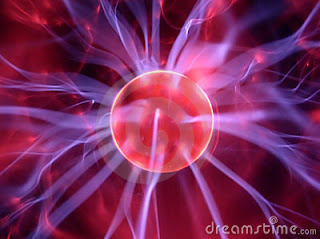
Link to this page

This image uses a center point with striking organic lines coming out of it. The layering of lines and the intensity of lines really gives the sense that something big has happened and this is the result. I think that this image really captures the essence of the word shock.

Precedent Four: Abstract 17  By Myabstracts
Link to this image

In the above image lines have been used to create curves that form  a swirling motion. the overlapping of the curves really build up intensity and speed in this image. I have picked this image because the swirling motion to me could suggest confusion which links back to the word insanity which I have chosen.

Precedent Five: Insanity
Link to this image
The above object incorporates lots of organic 3d curves. I like how they all connect and mould into each other. I have chosen this image because it is very asymmetrical as well as holding qualities that could suggest the essence of the word insanity. 


Precedent Six: Asymmetrical
Link to image
I chose this image because it is a perfect example of asymmetry. The contrast of black and white shows just how effective repeated curves can look when combined together. I think curves as simple as these have the potential to make a stunning model.

Precedent Seven: Swirled Symmetry
Link to image

I really love this image. This is another really great example of asymmetry but with a lot more going on. It uses what seems to be a cone shape repeated but in each cone there is repeated curves. The combination of all of the individual cones and shapes creates something quite full on and almost crazy. I think that this whole look of craziness is something which I can take on when making a model to describe the essence of the words shock, insanity and asymmetrical.

Precedent Eight: Asymmetrical Dispersion
Link to image

The final image which I have is asymmetrical also and uses a circle repeated in different varieties for example stretched, skewed, widened etc. It reminds me of some sort of shock/ sound wave. I really like the composition and sense of movement that it has and I think it just covers some part of each of the words I have chosen quite nicely. 

The images that I have chosen I think all have similarities. The use of curve is very dominate in each of the images. This is something which I would like to explore in my 81 iterations as I think the movement created from curves is one of the many things that visually describes and reminds me of what the words insanity, shock and asymmetrical look like.  

Monday, 16 July 2012

Project One: 3 Descriptive Words: a, n, v; 1 each


Below I have done abit of a brainstorm to get me started. I began with the three words, dreaming, skipping and laughing I chose these words because dreaming and laughing makes me happy and skipping well it was the first thing that poped into my head. From each of these words I have brainstormed off them and eventually come up with three words that link together and are either a noun,verb or adjective like required.


1. Noun: Insanity- The condition of being insane; a derangement of the mind; extreme foolishness.
I have chosen this word as my noun because I find the concept of how someone acting insane both interesting and terrifying. I think it is quite amazing just how minds can react to different situations at extremes which can put us and others around us in danger.

2. Verb: Shock(ed)- To strike or jar with intense surprise; horror; disgust etc; to undergo a shock.
I chose shock as the verb which I will use simply because I like the sound of the word as well as the reaction that is shown physically and through use of facial expressions when in shock.

3. Adjective: Asymmetrical- Not identical on both sides of a central line; uneven; irregular; unbalanced;  unequal; lopsided.
I love asymmetrical objects and patterns, It is this reason which I have chosen asymmetrical to be the adjective. It fascinates me how something asymmetrical can look quite complexed yet also so simple. I like how nothing is ever the same on one side. I think the word asymmetrical offers a lot of variety when beginning to combine it with the other words I have chosen.


Project One: Practice Exercise


In todays studio we started brainstorming ideas for the first project, 'Make and Modify'. These are some of the drawings I did for the word 'falling' to help me start thinking about what verb, adjective and noun I will pick to use as my finals.


Sunday, 15 July 2012

Project One: Result From Tutorials

After completing all of the recommended tutorials I feel slighty more confident using solidworks. It is alot to remember and I know that Im still going to struggle to use the program at times but after seeing the results of what I made during the tutorials I am really excited to start experimenting with some of my own ideas. The one thing I am yet to fully grasp in the program is understanding the planes and being able to visual what It will look like in my head. Below are some of the things I made in the tutorials. Not all of them are the completed version. Some are just pictutres that I took along the way.


 Assemblies Part One


 Introduction to Solid Works


 Introduction to Solid Works Part Two


3D Sketching